Pages

Showing posts with label tools. Show all posts

Friday, February 10, 2017

Google debuts DIY code tools for Android phones

BBC News - Google debuts DIY code tools for Android phones

This seems to be very interesting stuff... though at the outset it may seem a dampener for hard core techies who take joy in cracking tough nuts by themselves, I am sure these DIY code tools can certainly help the techies too to innovate and re-discover themselves in very new avatars... Need to check what exactly this has to offer. :)
Read More..

Thursday, January 12, 2017

Screens go Google at the Digital Signage Expo


Editors note: Chrome offers secure, customizable and easily manageable devices and apps for today’s business. Join us for Chrome Live, April 22-24, to learn how web-based solutions can help maximize your company’s productivity. Register here.

Since last year’s Digital Signage Expo and the introduction of Chrome’s single app kiosk mode, many customers and developers have built digital signage applications on Chromeboxes. Chromeboxes are secure, easy to manage and cost effective, making them ideal to display content and engage customers in any location. Chicos chose Chrome to manage and display content on over 5000 screens across more than 1500 stores.

We’ve done more with the Chrome platform to make signage even easier, adding new features that make it seamless to plan signage content and manage device health. Today, we’re announcing these capabilities:

  • The Chrome Sign Builder helps you create intelligent digital signs that are easy to build, schedule and deploy. You can add and manage content for any number of screens, and schedule that content to run when needed, across many screens at different times of day. A great example of this in action: displaying breakfast, lunch and dinner menus at various restaurant locations across multiple time zones.

  • The Chrome App Builder makes it easy to build third-party kiosk apps. You can set up applications to eliminate the “first-run” configuration process and rapidly deploy across multiple screens. We have several third party partners whove built solutions for signage including Stratos, Rise, Arreya, Wondersign, Four Winds Interactive, Scala, and Industry Weapon; and were adding more to this ecosystem.

  • Ongoing reporting monitors the health of your kiosks and signage at all times. You’ll get alerts from Chrome device management if a screen goes down, and can remotely reboot the device to get it back online without dispatching a technician. You can also get live updates about system usage and capture screen grabs to see exactly what viewers see.

In addition, today AOPEN announced three new commercial Chrome OS devices that will add more durability to digital signage. By working with AOPEN, we can offer more rugged hardware equipped to handle harsh conditions — like a hot and greasy back-of-house line at a restaurant.
If you’d like to learn more about these new devices and management features, visit us at the Digital Signage Expo in booth 2218 to see them in action or online. You can also register now for Chrome Live, a digital conference we’re hosting April 22-24.
Read More..

Tuesday, October 4, 2016

New Rooting Tools 1 0 for the HTC One M8 3 28 401 9


Here it is! Newest Rooting Tools 1.0 for the HTC One M8 3.28.401.9 system software just arrived. Dont want to flash any custom ROM but looking for a root access on your HTC One M8? No problem - its what Rooting Tools are for! Whats included?

  • [boot.img] disabled ro.adb.secure and ro.secure
  • [boot.img] disabled USB debugging icon on statusbar
  • [boot.img] enabled USB debugging by default
  • [boot.img] init.d scripts support (system/etc/init.d)
  • [boot.img] removed trigger command to execute install_recovery.sh to prevent stock recovery from being re-installed after each system reboot
  • latest SuperSu application (Superuser.apk) and binaries (su, daemonsu) (chainifre)
  • proper init.d script to run daemonsu binary as a daemon
  • special wp_mod.ko kernel module to disable HTC system RW protection (flar2)
  • proper init.d script to insert the wp_mod.ko module into the kernel
  • busybox
  • sysrw/sysro binaries for quick system partition re-mount
Device rooted with the above method should have no problems installing latest official OTA update because:

a) OTA update checks for files integrity, but it doesnt check if any extra files were added to the system partition.
b) OTA update doesnt check the integrity of the boot.img, so you can flash a custom kernel if you want.

boot.img source: 3.28.401.9
target device: HTC One M8 (0P6B10000)
target device OS version: 3.28.401.9

Download:
Rooting Tools are available for download here. More details and discussion about Rooting Tools can be found on my XDA thread.

If you are a power user and a custom ROMs flasher, you can also grab the latest Android Revolution HD based on the 3.28.401.9 update with many extra goodies under the hood.

All above files can be accessed via Downloads Page on my blog.

Do you have any questions or comments? Feel free to share! Also, if you like this article, please use media sharing buttons (Twitter, G+, Facebook) below this post!


For latest news follow Android Revolution HD on popular social platforms:

Read More..

Wednesday, June 8, 2016

SBK15 Official Mobile Game v1 1 1 APK DATA PAID

Cover art
https://play.google.com/store/apps/details?id=it.dtales.sbk15
NEW!!! Check out the “Mission: Impossible - Rogue Nation” bonus track: be an IMF agent and outrun the Syndicate to retrieve classified intel in Casablanca!

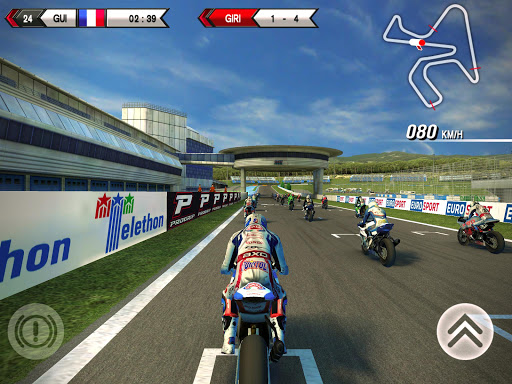
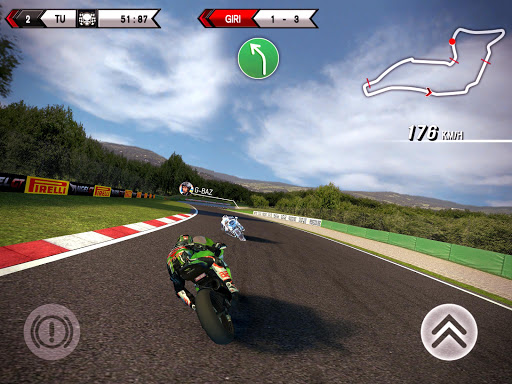
With over 4.5 million downloads under its belt and the support of passionate fans worldwide, the SBK Official Mobile Game is back for a new season.


Join the fray in the 2015 eni FIM Superbike World Championship: pick the bike of your dreams from the biggest brands in the world (Aprilia, Kawasaki, Honda, Ducati, Suzuki, MV Agusta, BMW) and hit the track! Ride shoulder to shoulder with the big guys, such as former champions Tom Sykes and Sylvain Guintoli! Push yourself to the limit in the new Time Attack Mode and don’t be afraid to unleash your inner speed demon!


Offering an advanced bike handling model based on player feedback, SBK15 is the next installment to the officially licensed, high-octane motorcycle racer on mobile and features:


— 13 WSBK rounds, including the brand-new Chang International Circuit in Thailand
— 24 elite riders grouped in 14 racing teams
— 3 game modes, namely Championship, Quick Race and Time Attack
— Enhanced physics engine
— Maximum control flexibility, with 9 configurations including gyroscope and virtual controls
— Realistic 3D graphics with dynamic lighting effects


SBK15 was developed in conjunction with Dorna WSBK Organization to ensure an accurate representation of the white-knuckle Superbike racing style and offer the most realistic motorcycle racing experience on mobile.

Whats New

- New “Mission: Impossible - Rogue Nation” track: be an IMF agent and outrun the Syndicate to retrieve classified intel in Casablanca!
- Exclusive “Mission: Impossible - Rogue Nation” trailer.


Download SBK15 Official Mobile Game v1.1.1 APK+DATA (Mod)
Read More..

Monday, March 21, 2016

New Rooting Tools 0 9 for the HTC One M8 3 28 401 7


Along with the latest Android 4.4.4 system dumps for the HTC One M8 we prepared an updated Rooting Tools 0.9 for the newest 3.28.401.7 system software. Whats included?
  • [boot.img] disabled ro.adb.secure and ro.secure
  • [boot.img] disabled USB debugging icon on statusbar
  • [boot.img] enabled USB debugging by default
  • [boot.img] init.d scripts support (system/etc/init.d)
  • [boot.img] removed trigger command to execute install_recovery.sh to prevent stock recovery from being re-installed after each system reboot
  • latest SuperSu application (Superuser.apk) and binaries (su, daemonsu) (chainifre)
  • proper init.d script to run daemonsu binary as a daemon
  • special wp_mod.ko kernel module to disable HTC system RW protection (flar2)
  • proper init.d script to insert the wp_mod.ko module into the kernel
  • busybox
  • sysrw/sysro binaries for quick system partition re-mount
Device rooted with the above method should have no problems installing latest official OTA update because:

a) OTA update checks for files integrity, but it doesnt check if any extra files were added to the system partition.
b) OTA update doesnt check the integrity of the boot.img, so you can even flash a custom kernel if you want.

boot.img source: 3.28.401.7
target device: HTC One M8 (0P6B10000)
target device OS version: 3.28.401.7

Download:
Rooting Tools are available for download here. More details and discussion about Rooting Tools can be found on my XDA thread.

If you are a power user and a custom ROMs flasher, you can also grab the latest Android Revolution HD based on the 3.28.401.6 update with many extra goodies under the hood.

All above files can be accessed via Downloads Page on my blog.

Do you have any questions or comments? Feel free to share! Also, if you like this article, please use media sharing buttons (Twitter, G+, Facebook) below this post!


For latest news follow Android Revolution HD on popular social platforms:

Read More..