Pages

Showing posts with label htc. Show all posts

Saturday, January 21, 2017

HTC First Facebook dedicated smartphone

Few weeks of rumors and speculations and here we have - new HTC device, called HTC First and created together with (and for!) Facebook. Its surely not a flagship model, but also not a low-end device.

Actually it has quite nice specifications:

  • Platform: Android 4.1
  • Processor: Qualcomm® MSM8930AA 1.4Ghz, dual-core
  • Memory: 16 GB, 1 GB RAM
  • GSM 850/900/1800/1900/2100, HSDPA 21/5.76, LTE 4/17
  • Display: 4.3-inch, HD 720p
  • Battery: 2000mAh (non-removable)
  • Main camera: 5 MP camera with auto focus, LED flash, BSI sensor, f/2.0 aperture, 28mm lens, 1080p video recording
  • Front camera: 1.6 MP camera
  • Dimensions: 4.96 x 2.56 x 0.35 (in) (LxWxT)
  • Weight: 4.37 oz

What is special about this device, is very deep Facebook integration. It has its own Facebook launcher instead of HTC Sense launcher. What else?

  • Cover feed: A constant, fresh stream of photos and updates from your newsfeed, cover feed is always present when you wake up your phone.  It lets you stay up-to-date on your friends’ latest activities in real-time, all the time.  You can swipe through to see more photos and updates, double tap to “like” a post and comment right from cover feed.  To learn more about cover feed, check out this video.
  • Notifications: Notifications from apps and friends appear right on your home screen.  It’s easier to see when you have a missed call, calendar reminder or new message. Open a notification with a double tap or clear them away to see your Cover Feed.  To learn more about notifications, check out this video.
  • Chat Heads: The mobile messenger lets you jump in and out of conversations while you do other things, like watch a video and browse the web.  Reply right from chat heads, or move them around if youre not ready to respond. Plus you can send and receive texts and Facebook messages from the same spot.  To learn more about chat heads, check out this video.
  • App Launcher:  See your favorite apps and post right to Facebook from the same spot. You choose what’s on your app launcher—press and hold an app then drag it anywhere.
  • Instagram:  HTC First is the only phone that comes with Instagram pre-loaded.

Personally, Im very curious how this device will work with its custom launcher and what will be customers judgement. I think it has a huge potential. The idea of new custom launcher is more then interesting. Lets take a quick pick how it looks like:


To me, it seems to be very simplified version of Android launcher. It might be a great choice for users who are not expecting their phone to be multimedia all-in-one device, but they want to easily stay in touch with their friends using the most popular social channel. There is also Instagram pre-installed, so sharing your great moments captured with 5 MP back camera will be easy as well. Additionally, it is very likely that the overall system performance in HTC First will be very good. Qualcomm 1.4 GHz dual-core CPU in pair with 1GB of RAM memory will probably bring you smooth user interface experience, considering the fact that device doesnt have pretty heavy HTC Sense on board. So, do you think it is a device for you?

Have any questions or comments? Feel free to share! Also, if you like this article, please use media sharing buttons (Twitter, G+, Facebook) down this post!


Read More..

Friday, January 20, 2017

Sense 5 Toolbox the best customizer for HTC Sense 5 based ROMs


If you havent used it yet - you really should. Im talking about the "Sense 5 Toolbox" application, made initially for Android Revolution HD. In the last few weeks the popularity of this application reached an unexpected level, and we believe its a reason to celebrate.

More details about the Sense 5 Toolbox can be found on this blog, under "Sense 5 Toolbox" link on the right panel. Or, just click here.

Why Sense 5 Toolbox?

The application is an answer for 2 basic issues: many users wants to customize their OS as much as possible, but currently available solutions similar to Sense 5 Toolbox are very limited when it comes to the possibility of using them on most custom ROMs.

Android Revolution HD is known to be a "stock-looking" ROM, which was always the most important aspect for many users, who were looking for a stable and well known custom ROM. However, having a custom ROM with such popularity brought our attention to many users, who were looking for a stable custom ROM, but also with a little touch of customisation features - like displaying the battery percentage, or being able to re-order or re-design some part of the UI. This leads to two different approaches:
  1. having a custom ROM full of many more or less advanced features coded into the framework, which always ends up with all sort of issues, bugs, waiting a long time for a new ROM version based on freshly released official OS update etc; or
  2. having a custom ROM like Android Revolution HD, close to stock with just a few changes under the hood to make Android users life easier, combined with a standalone application like Sense 5 Toolbox.
The result is what most users are looking for: stock looking by default, a stable and optimized custom ROM - but with the capability to change many things inside the OS.

With Android Revolution HD and Sense 5 Toolbox you have:
  1. fast updates when a new OS is released/leaked,
  2. a stable custom ROM,
  3. the capability to customize your OS,
  4. great performance because of the tweaks under the hood,
  5. many features not available on the stock ROM.
The Sense 5 Toolbox is under continuous development. More and more features are coming with each new release and the "to do" list is quite large.


In the background, another project is still alive and under heavy development too. Im referring to the "Revolution Toolbox" application, announced in this post few weeks ago. Its still being tested, however we are getting close to the first public beta. Just one little secret I can say out loud now - Revolution Toolbox and Sense 5 Toolbox will "connected" in a particular way. Cant say more for now, stay tuned!

Have any questions or comments? Feel free to share! Also, if you like this article, please use media sharing buttons (Twitter, G+, Facebook) below this post!
Read More..

The HTC M8 to be launched on 25 03 2014


It seems that we finally know the date – 25.03.2014 looks like the day when HTC will launch their new flagship device and the HTC One (M7) successor – HTC One M8 which is rumoured to be called "HTC One+" or "HTC One 2" or just " HTC One (M8)".

About the device itself we know pretty much already. Recently we wrote about the design (The HTC One 2014 (M8) design exposed) and weve seen some popular mock-ups made by hamdir in HTC One 2014 (M8) target renders, a visual compilation of all the leaks. I must say this all looks promising and we still hope to see HTC M8 equipped with Qualcomm Snapdragon 805 instead of an already one year old Snapdragon 800 SoC.

Have any questions or comments? Feel free to share! Also, if you like this article, please use media sharing buttons (Twitter, G+, Facebook) below this post!


For latest news / announcements follow Android Revolution HD on popular social platforms:

Read More..

Tuesday, January 17, 2017

HTC Sense 6 0 Bluetooth security issue explained

Bluetooth is not a new technology and has long been associated with hands free headsets but with newer devices over the last few years it has obviously evolved into a technology that connects to printers, headphones, speakers, cars and of course other phones.

It wasnt long ago that I still used a Microsoft Zune with my phone sitting idle as I didnt trust the battery or it didnt have the capacity to store my music library, it has only been due to looking into the issue I am going to describe that I have begun to consider using a Bluetooth headset, reflecting on the pain of trying to untangle my headphones as I make my daily commute into the city.

But I digress, I made a discovery on the new HTC One M8 (originally noticed on the M7 port by rider5512) that when I shared had a few other users concerned about using Bluetooth securely.


One of the advantages of being an early adopter and someone who has owned the previous iteration of a flag ship model is that you quickly spot the changes that have been made and one of them was a change in the Bluetooth setup where the ability to set a visibility time out was no longer present and the only options I could see for Bluetooth were on or off.

I checked some other devices, including the Sony Xperia Tablet Z (running the latest nightly of Cyanogenmod 11), the HTC One M7 and the LG G2. I also saw, via a quick Google search that this was standard for Apple devices.

Here you can see that same interface on the HTC One M7 (on Sense 5.5) with visibility time-out options from Cyanogenmod 11 showing on the right:


Of all the other models I checked, only the HTC One M8 lacked this visibility option.


So why might this be a concern?

If your device is visible it means that anyone with a Bluetooth connection can see it, there have been pranks with the name Bluejacking where you can be sent unsolicited text message and pictures which are mostly harmless or as you imagine explicit but nothing more than nuisance, with no data being stolen.

In more extreme cases there is something that is called Bluesnarfing (which sounds ridiculous I know) where an attacker can change or copy information from your phone such as your phone book, address book and calendar or even taking it over completely. Obviously this situations are rare and extreme and as a smart reader of this blog, you are likely avoiding it.

At the very least you will be exposing your Bluetooth address to others, for the paranoid Bluetooth can also be used to track you. Certainly if more people in Hollywood were able to disable Bluetooth visibility the cast of Person of Interest would certainly have to do more work than forced pairing.

Having a visible device will also increase battery consumption!

I asked Jason Dunn, the current outgoing Senior Manager of the HTC community about this and he quickly got a few details from me and escalated it as initially he thought his was current practice as it didnt seem to be broken function on the M8 but the lack of option altogether.

In less than a week (a credit again to Jason and HTC for working closely with the community), Jason was able to give me a simple yet delightful answer.

In simplest terms, the device is only in discover mode, while you are present in the Bluetooth settings screen.

Again, so simple but that has two strong reasons:
  • You won’t accidentally leave the device in a discoverable state.
  • For non-technical end-users it provides a simple yet effective way for them to easily connect their device to other Bluetooth devices.
You can see a quick demonstration below, on the top my Xperia has been unable to find my One M8, on the bottom (and you will have to take my word for it) is in the Bluetooth settings screen and therefore visible.


Basically, HTC have done a great implementation for end users that does not compromise security at all! Once paired the devices will continue to function and connect as you would expect!

On a final note, it is very sad to see Jason moving on from his position at HTC, but I continue to look forward to his thoughts on Twitter and I already had the pleasure of meeting his replacement, Laura Kimball, at the HTC London meet last month.

Great job HTC!

Have any questions or comments? Feel free to share! Also, if you like this article, please use media sharing buttons (Twitter, G+, Facebook) below this post!

For latest news follow Android Revolution HD on popular social platforms:

Read More..

Monday, January 16, 2017

HTC One M9 Hima design concept


Just few minutes ago Phone Designer posted on their Facebook page a new concepts of the incoming HTC high-end device - HTC One M9 "Hima". The authors warned that the concept is based on the current leaks and they cant promise the final product will look exactly the same.

My thoughts? Actually I really hope it will look exactly the same! Pictures are just stunning!


Do you have any questions or comments? Feel free to share! Also, if you like this article, please use media sharing buttons (Twitter, G+, Facebook) below this post!


For latest news follow Android Revolution HD on popular social platforms:

Read More..

Friday, December 30, 2016

Android 4 3 update for HTC One


HTC One finally received official Android 4.3 Jelly Bean update from HTC. So far the update is available for only 2 CID/MID variants:

  • x.xx.709.x for Asia TW (Taiwan) - from 2.24.709.1 to 3.18.709.2
  • x.xx.1540.x for Developer Edition - from 1.29.1540.17 to 3.22.1540.1

Both OTA updates are around 550 MB so its pretty large update. Keep in mind you cant flash particular OTA update on the device with different CID/MID. That said, international users (WWE x.xx.401.x) still needs to wait for proper OTA package.


In a mean time we had some preview of whats coming along with Android 4.3 for HTC One in a leaked 3.17.502.2 software for Cingular US (United States). The reason why x.xx.502.x software was ready in a first place was the release of HTC One blue variant for U.S. AT&T network provider. You can find the latest Android Revolution HD 21.0 based on this software under this link.

If you dont want to wait for WWE update, there might be something special coming today for all HTC One users. Android Revolution HD 22.0 should be available soon in my xda-developers thread under this link.

Have any questions or comments? Feel free to share! Also, if you like this article, please use the media sharing buttons (Twitter, G+, Facebook) below this post!
Read More..

Monday, December 26, 2016

Give Away HTC One X

Here is something awesome for Android Revolution HD users. I will give away one, brand new HTC One X+ (GSM only) in color of your choice - black or white, to one winner of this little competition. There is no country limit - its a worldwide party!

The competition starts at 12:00 PM (GMT + 1) on Monday 4th, March 2013 and will continue until 12:00 PM (GMT + 1) on Sunday 10th, March 2013. Winner will be announced on Monday 11th, March 2013.

What you need to do:

1) "Like" HTC (facebook.com/htc) and Android Revolution HD (facebook.com/AndroidRevolutionHD) on Facebook

2) "Follow" HTC (@HTC) and Android Revolution HD (@mike1986_) on Twitter

3) Tweet about this contest with link to this page using hash-tag "androidrevolutionhd" (#androidrevolutionhd)
Example tweet: Win HTC One X+ at http://android-revolution-hd.blogspot.com/2013/02/give-away-htc-one-x.html #androidrevolutionhd

Note: If you already meet the requirements from points 1 and 2, now all you need to do is tweet! No need to re-follow or re-like accounts mentioned above. Re-tweets doesnt count. This must be your own tweet. Remember to include link to this contest and hash-tag #androidrevolutionhd.

How will I select the winner? I will randomly choose one person from the list of my Twitter followers who tweeted about this give away using #androidrevolutionhd hash-tag. Is that all? Yes! Easy as that! Just 2 clicks and 1 tweet to win amazing, high-end HTC One X+ - Engadgets Smartphone of the Year! 

Good luck!


Want to learn more about HTC One X+?
Visit this site - HTC One X+ overview
Read More..

Thursday, December 22, 2016

HTC Sense 7 0 Custom Navigation Bar

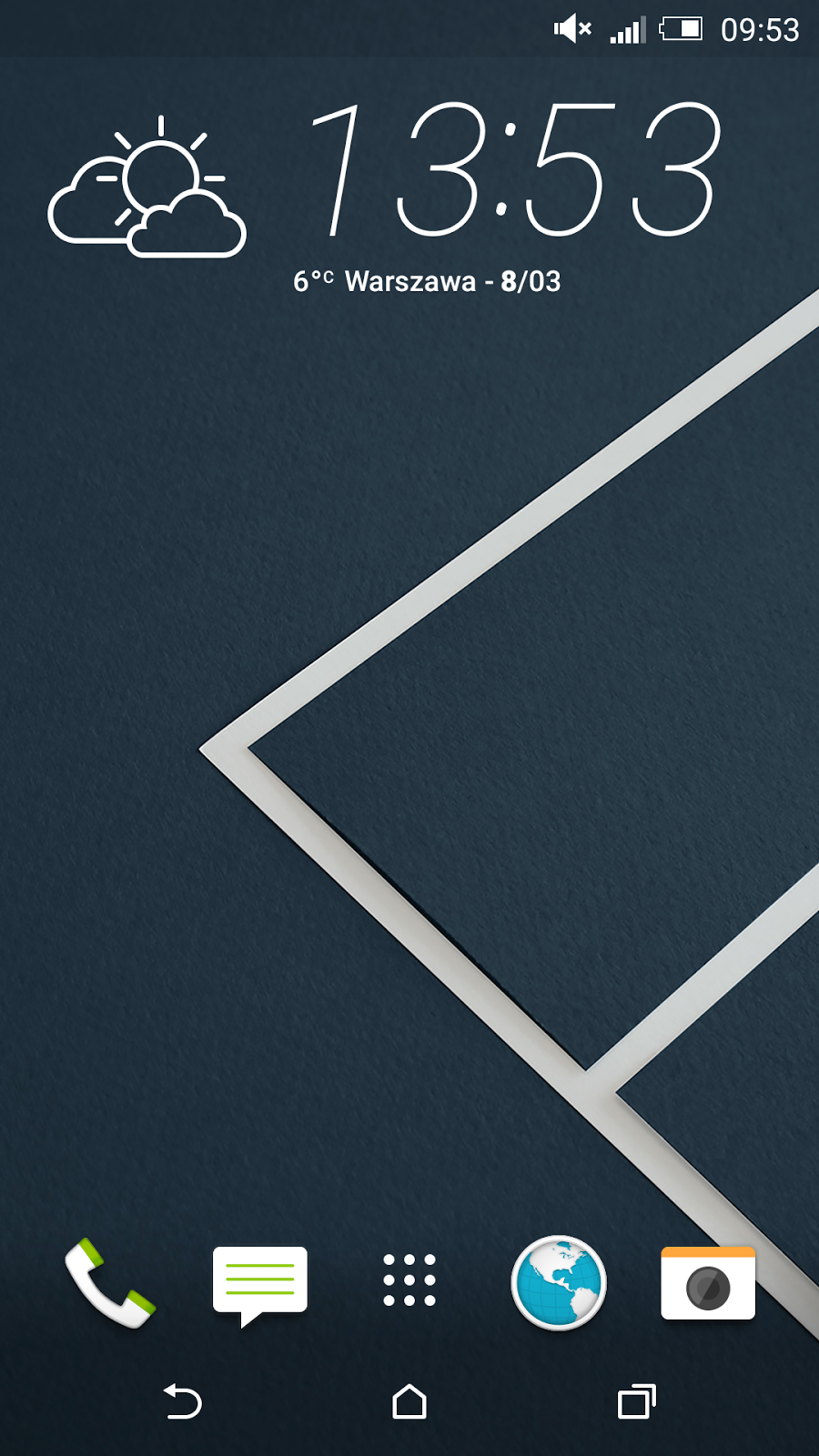
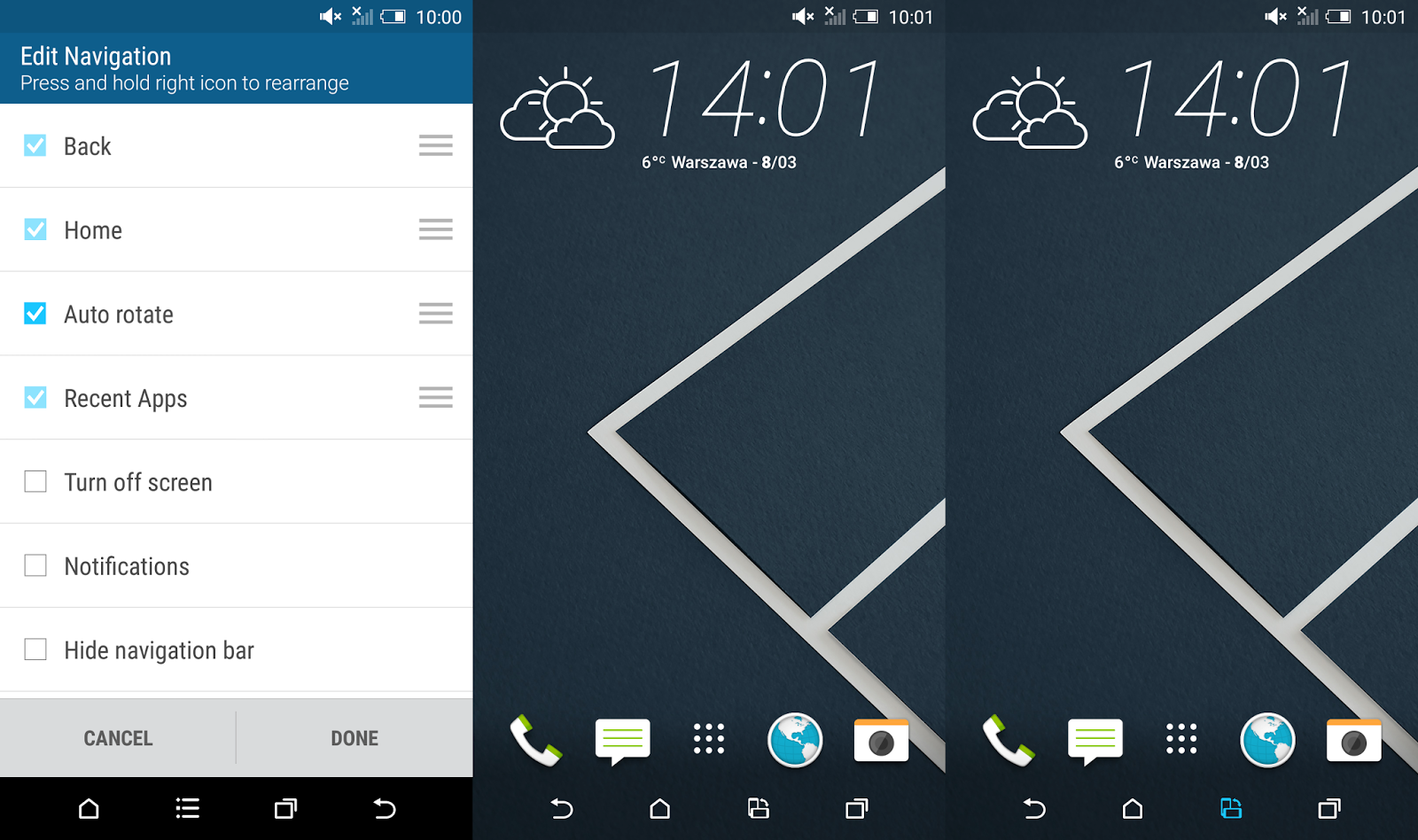
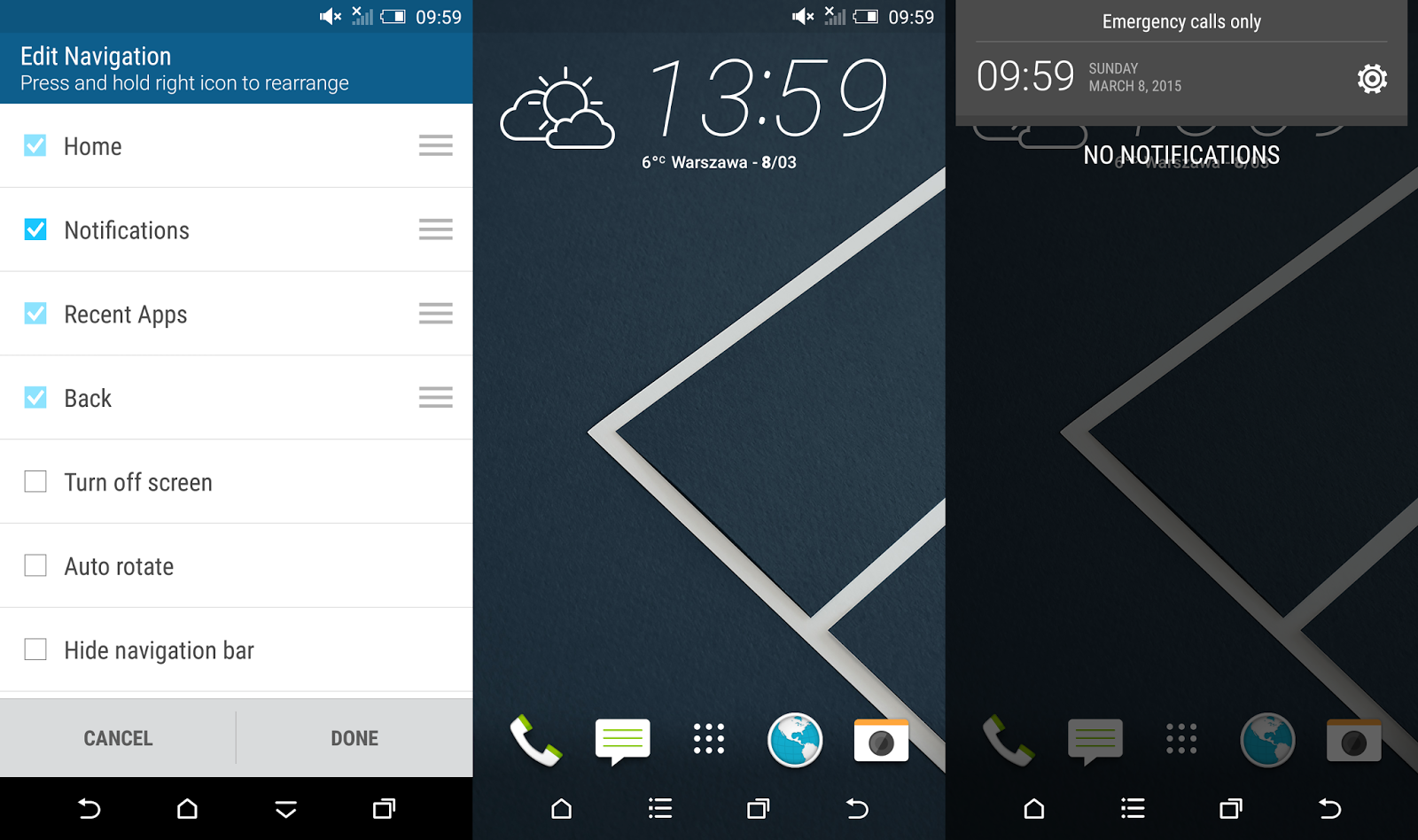
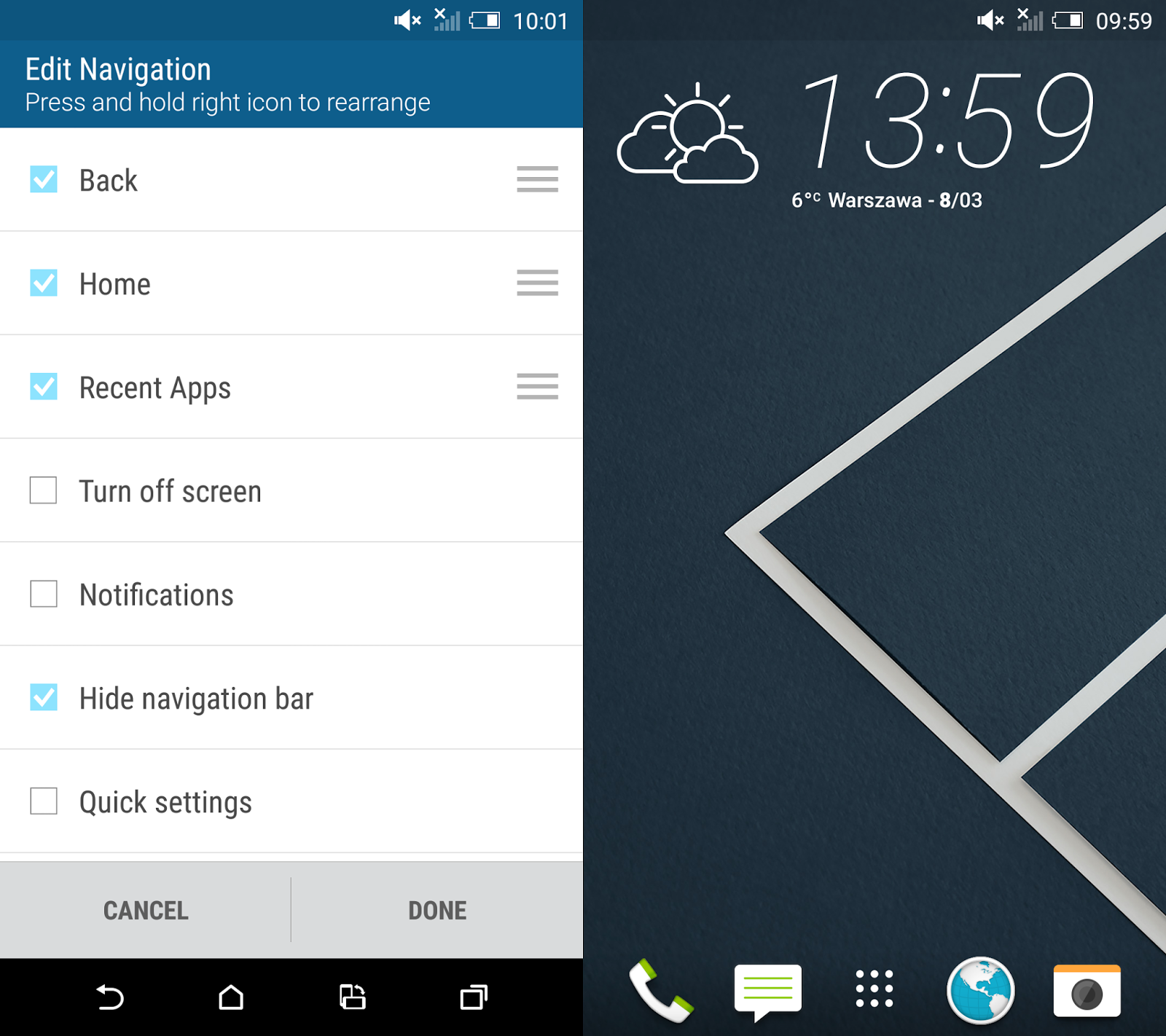
Youve probably heard already about the new cool HTC Sense 7.0 feature called Themes Generator. In fact thats not the only surprise in the newest HTC custom user interface. In the sixth version of the Sense UI HTC opted for extensive configuration options of the Android Navigation Bar. Now in addition to the existing three main on-screen buttons you can choose a 4th button with a specific function.


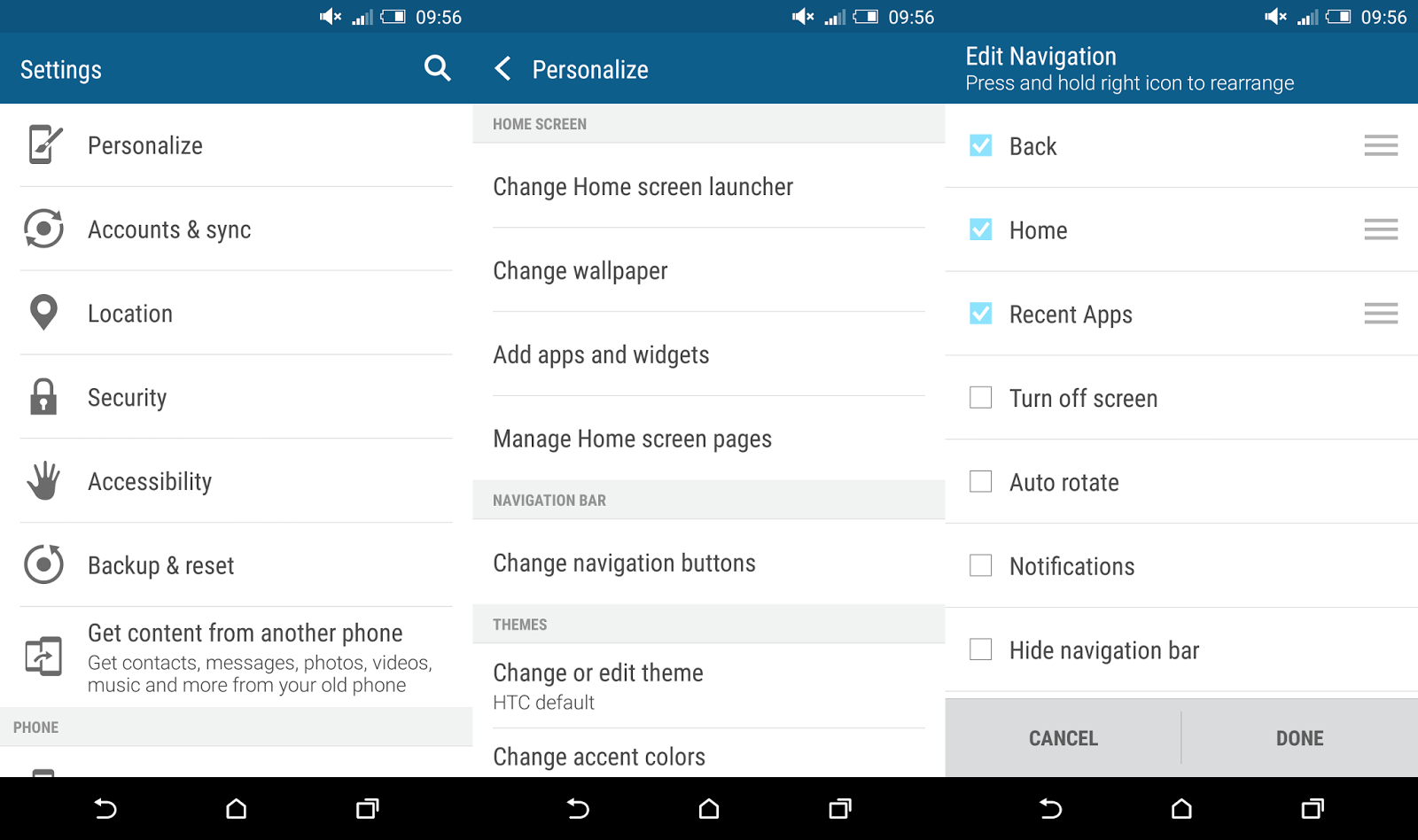
To enter these settings you need to go to Settings ---> Personalize ---> Change navigation button. As you can see, HTC gave us a couple of options there:
  • Back
  • Home
  • Recent apps

These are the default on-screen buttons and you cant disable any of it. Plus we got several more, but you can enable only one at a time:
  • Turn off screen
  • Auto rotate
  • Notifications
  • Quick settings
  • Hide navigation bar
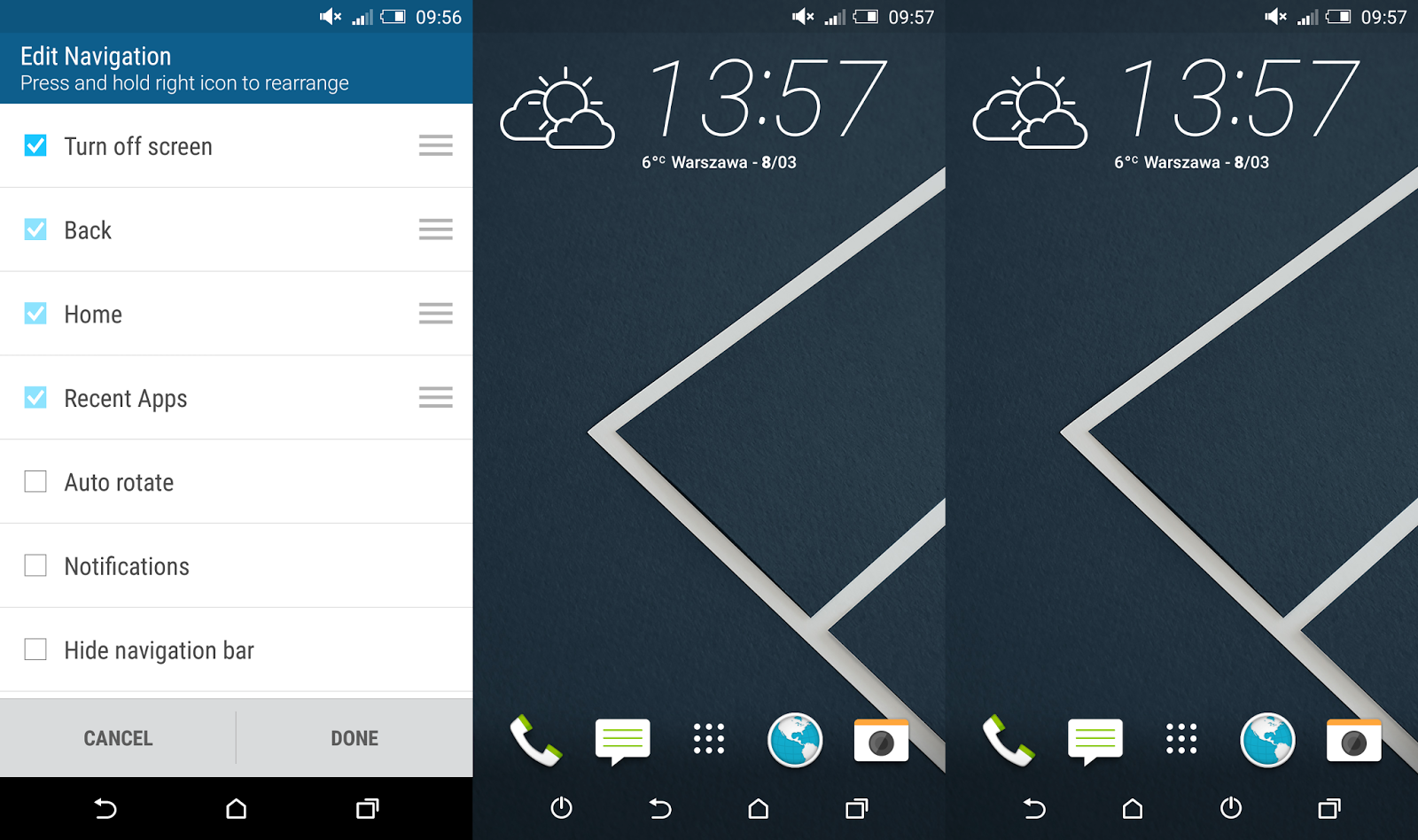
According to the screenshot you can not only add a 4th button but also re-arrange the position of all buttons. That means you can have your extra button either on the right or left side of the navigation bar or between other buttons.

The "Turn off screen" button can be really handy in case you want to switch off your screen really fast, without moving the finger outside the screen area. In combination with HTC Motion Launch Gestures (double tap to wake-up in this case) you dont need to use power button any more!


The "Auto rotate" feature doesnt seems like something I would access few times a day. Personally I would prefer to have a "Rotate" function there to force the screen orientation I want to use in a particular moment, no matter how I keep the device (horizontally or vertically).


The "Notifications" button is a great alternate for the swipe down the status bar gesture when you want to access notifications.


The "Quick Settings" button, just like "Notifications" button allows you to quick access the pull down menu without having to swipe down from the top of the screen.


Last but not least, the "Hide navigation bar" button is one of my favourite. It allows you to completely hide the navigation bar and visually enlarge the home screen. To bring it back you just need to swipe up from the bottom part of the screen. Cool, isnt it?


Do you have any questions or comments? Feel free to share! Also, if you like this article, please use media sharing buttons (Twitter, G+, Facebook) below this post!


For latest news follow Android Revolution HD on popular social platforms:

Read More..