Pages

Showing posts with label sense. Show all posts

Friday, January 20, 2017

Sense 5 Toolbox the best customizer for HTC Sense 5 based ROMs


If you havent used it yet - you really should. Im talking about the "Sense 5 Toolbox" application, made initially for Android Revolution HD. In the last few weeks the popularity of this application reached an unexpected level, and we believe its a reason to celebrate.

More details about the Sense 5 Toolbox can be found on this blog, under "Sense 5 Toolbox" link on the right panel. Or, just click here.

Why Sense 5 Toolbox?

The application is an answer for 2 basic issues: many users wants to customize their OS as much as possible, but currently available solutions similar to Sense 5 Toolbox are very limited when it comes to the possibility of using them on most custom ROMs.

Android Revolution HD is known to be a "stock-looking" ROM, which was always the most important aspect for many users, who were looking for a stable and well known custom ROM. However, having a custom ROM with such popularity brought our attention to many users, who were looking for a stable custom ROM, but also with a little touch of customisation features - like displaying the battery percentage, or being able to re-order or re-design some part of the UI. This leads to two different approaches:
  1. having a custom ROM full of many more or less advanced features coded into the framework, which always ends up with all sort of issues, bugs, waiting a long time for a new ROM version based on freshly released official OS update etc; or
  2. having a custom ROM like Android Revolution HD, close to stock with just a few changes under the hood to make Android users life easier, combined with a standalone application like Sense 5 Toolbox.
The result is what most users are looking for: stock looking by default, a stable and optimized custom ROM - but with the capability to change many things inside the OS.

With Android Revolution HD and Sense 5 Toolbox you have:
  1. fast updates when a new OS is released/leaked,
  2. a stable custom ROM,
  3. the capability to customize your OS,
  4. great performance because of the tweaks under the hood,
  5. many features not available on the stock ROM.
The Sense 5 Toolbox is under continuous development. More and more features are coming with each new release and the "to do" list is quite large.


In the background, another project is still alive and under heavy development too. Im referring to the "Revolution Toolbox" application, announced in this post few weeks ago. Its still being tested, however we are getting close to the first public beta. Just one little secret I can say out loud now - Revolution Toolbox and Sense 5 Toolbox will "connected" in a particular way. Cant say more for now, stay tuned!

Have any questions or comments? Feel free to share! Also, if you like this article, please use media sharing buttons (Twitter, G+, Facebook) below this post!
Read More..

Tuesday, January 17, 2017

HTC Sense 6 0 Bluetooth security issue explained

Bluetooth is not a new technology and has long been associated with hands free headsets but with newer devices over the last few years it has obviously evolved into a technology that connects to printers, headphones, speakers, cars and of course other phones.

It wasnt long ago that I still used a Microsoft Zune with my phone sitting idle as I didnt trust the battery or it didnt have the capacity to store my music library, it has only been due to looking into the issue I am going to describe that I have begun to consider using a Bluetooth headset, reflecting on the pain of trying to untangle my headphones as I make my daily commute into the city.

But I digress, I made a discovery on the new HTC One M8 (originally noticed on the M7 port by rider5512) that when I shared had a few other users concerned about using Bluetooth securely.


One of the advantages of being an early adopter and someone who has owned the previous iteration of a flag ship model is that you quickly spot the changes that have been made and one of them was a change in the Bluetooth setup where the ability to set a visibility time out was no longer present and the only options I could see for Bluetooth were on or off.

I checked some other devices, including the Sony Xperia Tablet Z (running the latest nightly of Cyanogenmod 11), the HTC One M7 and the LG G2. I also saw, via a quick Google search that this was standard for Apple devices.

Here you can see that same interface on the HTC One M7 (on Sense 5.5) with visibility time-out options from Cyanogenmod 11 showing on the right:


Of all the other models I checked, only the HTC One M8 lacked this visibility option.


So why might this be a concern?

If your device is visible it means that anyone with a Bluetooth connection can see it, there have been pranks with the name Bluejacking where you can be sent unsolicited text message and pictures which are mostly harmless or as you imagine explicit but nothing more than nuisance, with no data being stolen.

In more extreme cases there is something that is called Bluesnarfing (which sounds ridiculous I know) where an attacker can change or copy information from your phone such as your phone book, address book and calendar or even taking it over completely. Obviously this situations are rare and extreme and as a smart reader of this blog, you are likely avoiding it.

At the very least you will be exposing your Bluetooth address to others, for the paranoid Bluetooth can also be used to track you. Certainly if more people in Hollywood were able to disable Bluetooth visibility the cast of Person of Interest would certainly have to do more work than forced pairing.

Having a visible device will also increase battery consumption!

I asked Jason Dunn, the current outgoing Senior Manager of the HTC community about this and he quickly got a few details from me and escalated it as initially he thought his was current practice as it didnt seem to be broken function on the M8 but the lack of option altogether.

In less than a week (a credit again to Jason and HTC for working closely with the community), Jason was able to give me a simple yet delightful answer.

In simplest terms, the device is only in discover mode, while you are present in the Bluetooth settings screen.

Again, so simple but that has two strong reasons:
  • You won’t accidentally leave the device in a discoverable state.
  • For non-technical end-users it provides a simple yet effective way for them to easily connect their device to other Bluetooth devices.
You can see a quick demonstration below, on the top my Xperia has been unable to find my One M8, on the bottom (and you will have to take my word for it) is in the Bluetooth settings screen and therefore visible.


Basically, HTC have done a great implementation for end users that does not compromise security at all! Once paired the devices will continue to function and connect as you would expect!

On a final note, it is very sad to see Jason moving on from his position at HTC, but I continue to look forward to his thoughts on Twitter and I already had the pleasure of meeting his replacement, Laura Kimball, at the HTC London meet last month.

Great job HTC!

Have any questions or comments? Feel free to share! Also, if you like this article, please use media sharing buttons (Twitter, G+, Facebook) below this post!

For latest news follow Android Revolution HD on popular social platforms:

Read More..

Friday, December 30, 2016

Android 4 3 update for HTC One


HTC One finally received official Android 4.3 Jelly Bean update from HTC. So far the update is available for only 2 CID/MID variants:

  • x.xx.709.x for Asia TW (Taiwan) - from 2.24.709.1 to 3.18.709.2
  • x.xx.1540.x for Developer Edition - from 1.29.1540.17 to 3.22.1540.1

Both OTA updates are around 550 MB so its pretty large update. Keep in mind you cant flash particular OTA update on the device with different CID/MID. That said, international users (WWE x.xx.401.x) still needs to wait for proper OTA package.


In a mean time we had some preview of whats coming along with Android 4.3 for HTC One in a leaked 3.17.502.2 software for Cingular US (United States). The reason why x.xx.502.x software was ready in a first place was the release of HTC One blue variant for U.S. AT&T network provider. You can find the latest Android Revolution HD 21.0 based on this software under this link.

If you dont want to wait for WWE update, there might be something special coming today for all HTC One users. Android Revolution HD 22.0 should be available soon in my xda-developers thread under this link.

Have any questions or comments? Feel free to share! Also, if you like this article, please use the media sharing buttons (Twitter, G+, Facebook) below this post!
Read More..

Thursday, December 22, 2016

HTC Sense 7 0 Custom Navigation Bar

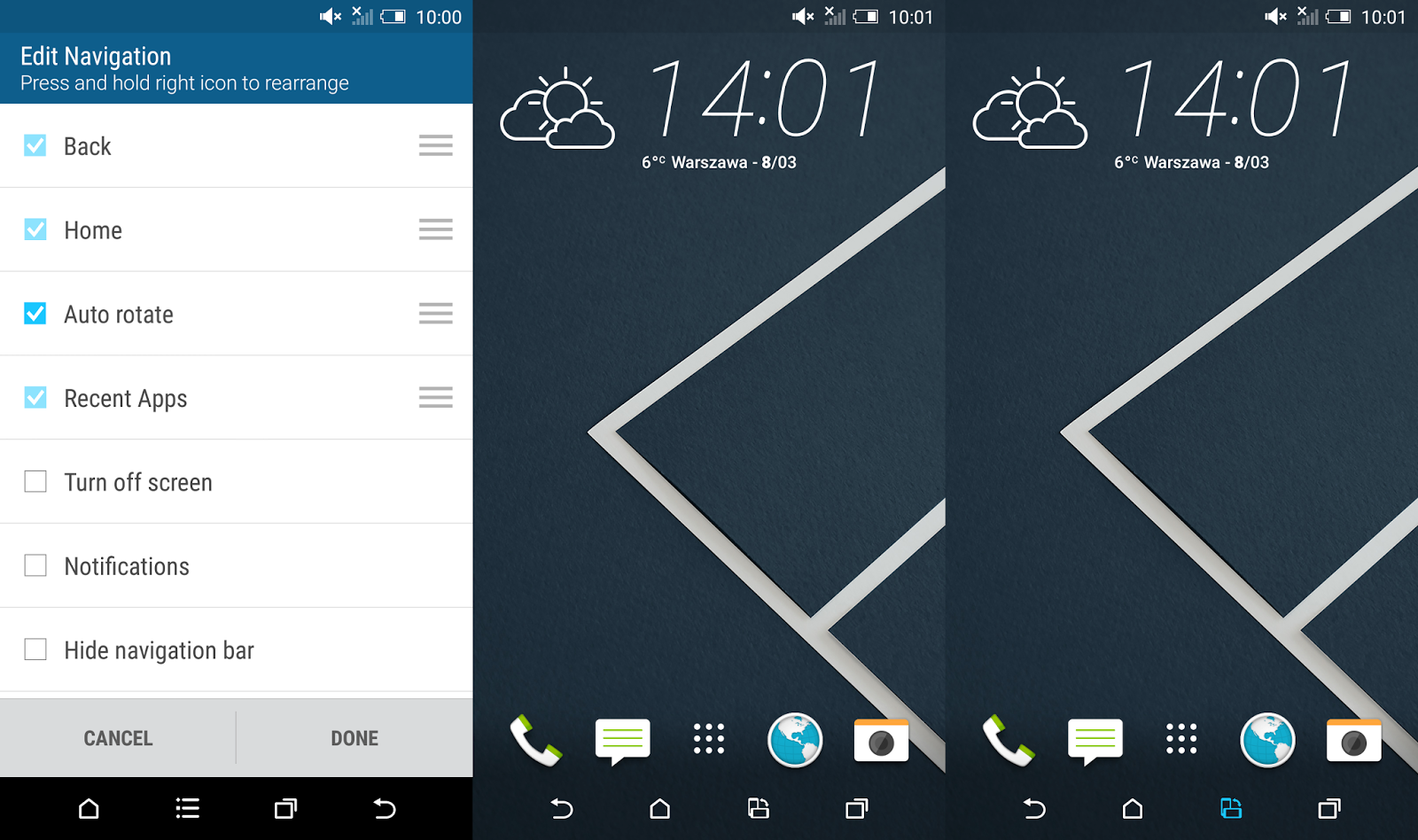
Youve probably heard already about the new cool HTC Sense 7.0 feature called Themes Generator. In fact thats not the only surprise in the newest HTC custom user interface. In the sixth version of the Sense UI HTC opted for extensive configuration options of the Android Navigation Bar. Now in addition to the existing three main on-screen buttons you can choose a 4th button with a specific function.


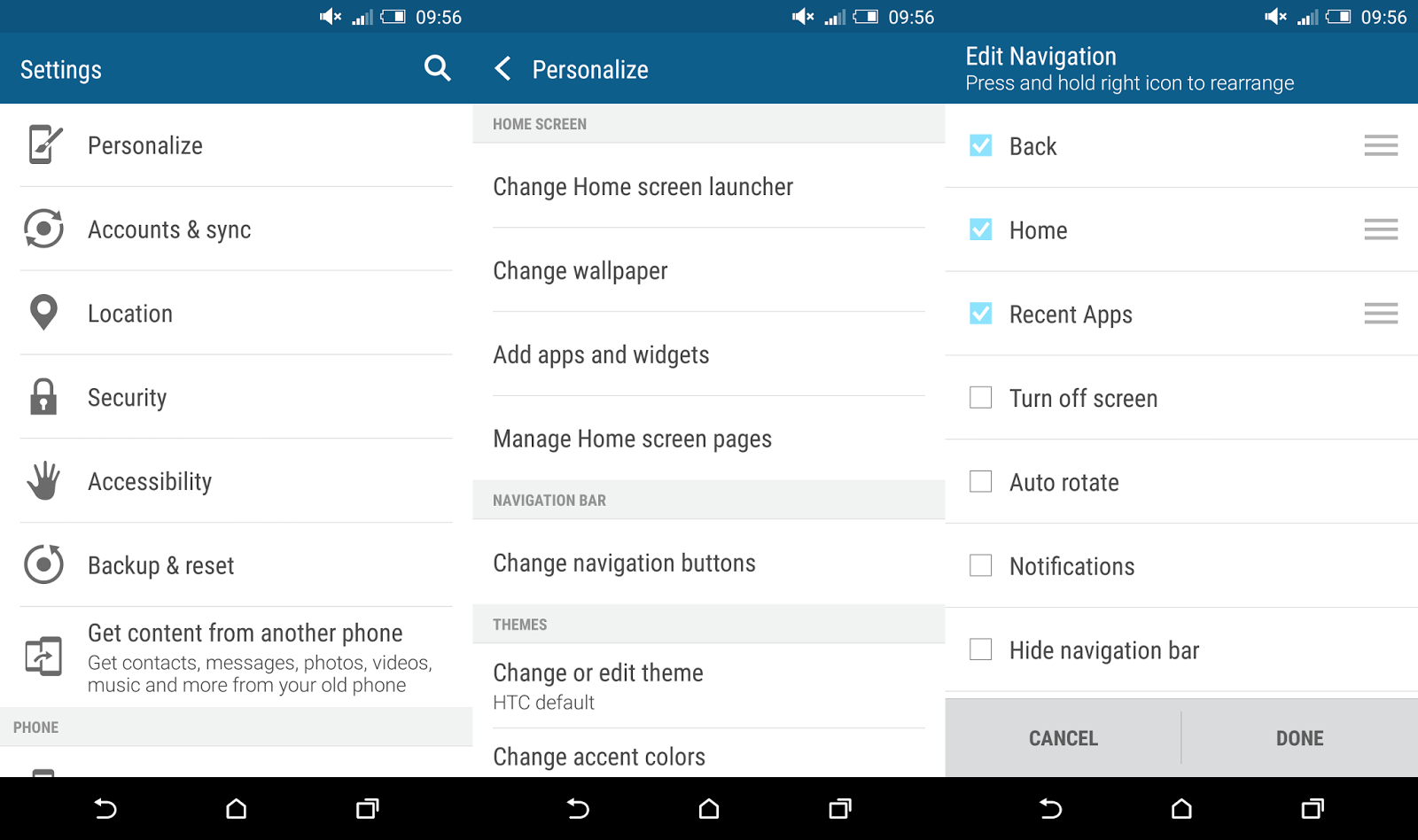
To enter these settings you need to go to Settings ---> Personalize ---> Change navigation button. As you can see, HTC gave us a couple of options there:
  • Back
  • Home
  • Recent apps

These are the default on-screen buttons and you cant disable any of it. Plus we got several more, but you can enable only one at a time:
  • Turn off screen
  • Auto rotate
  • Notifications
  • Quick settings
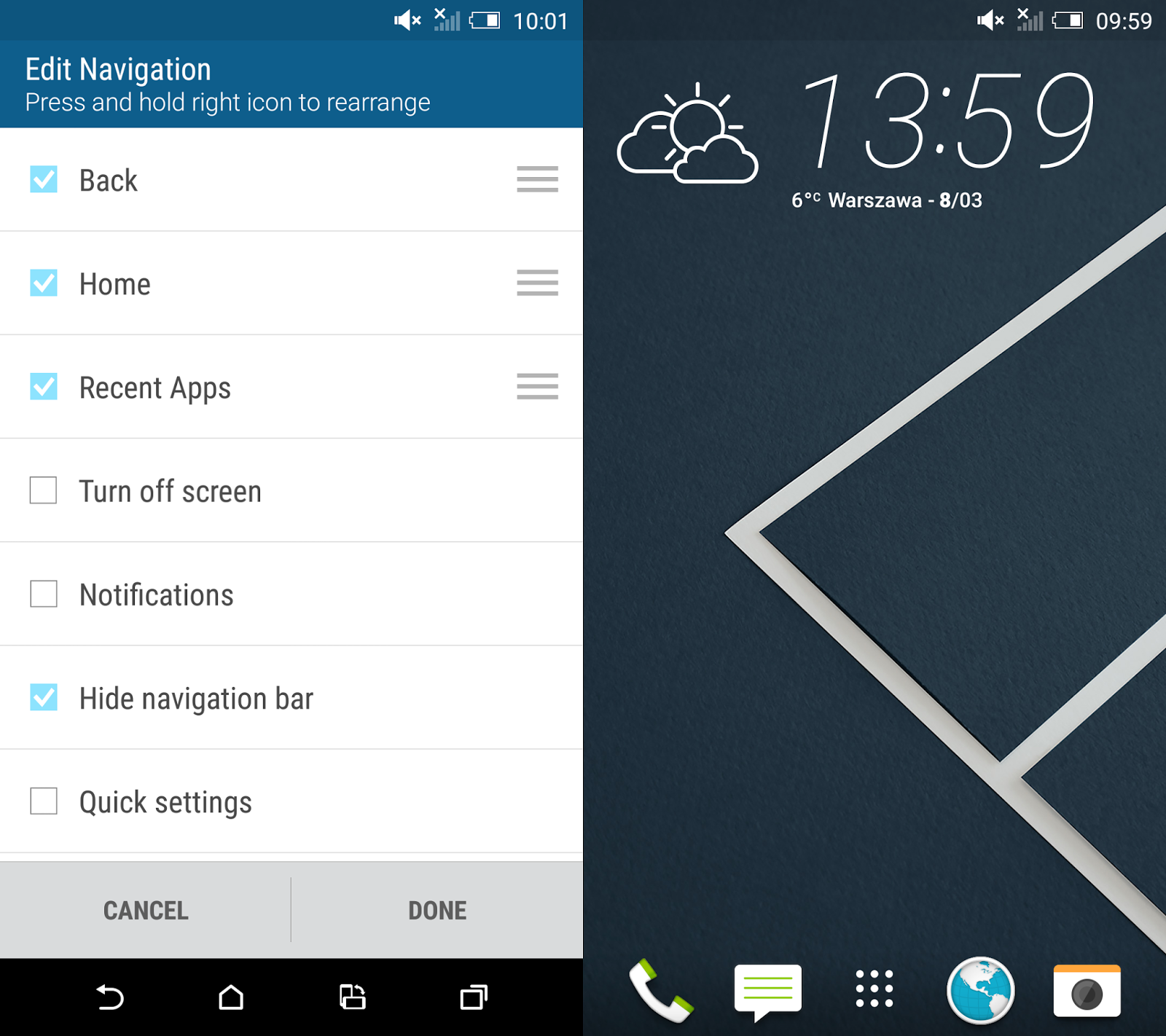
  • Hide navigation bar
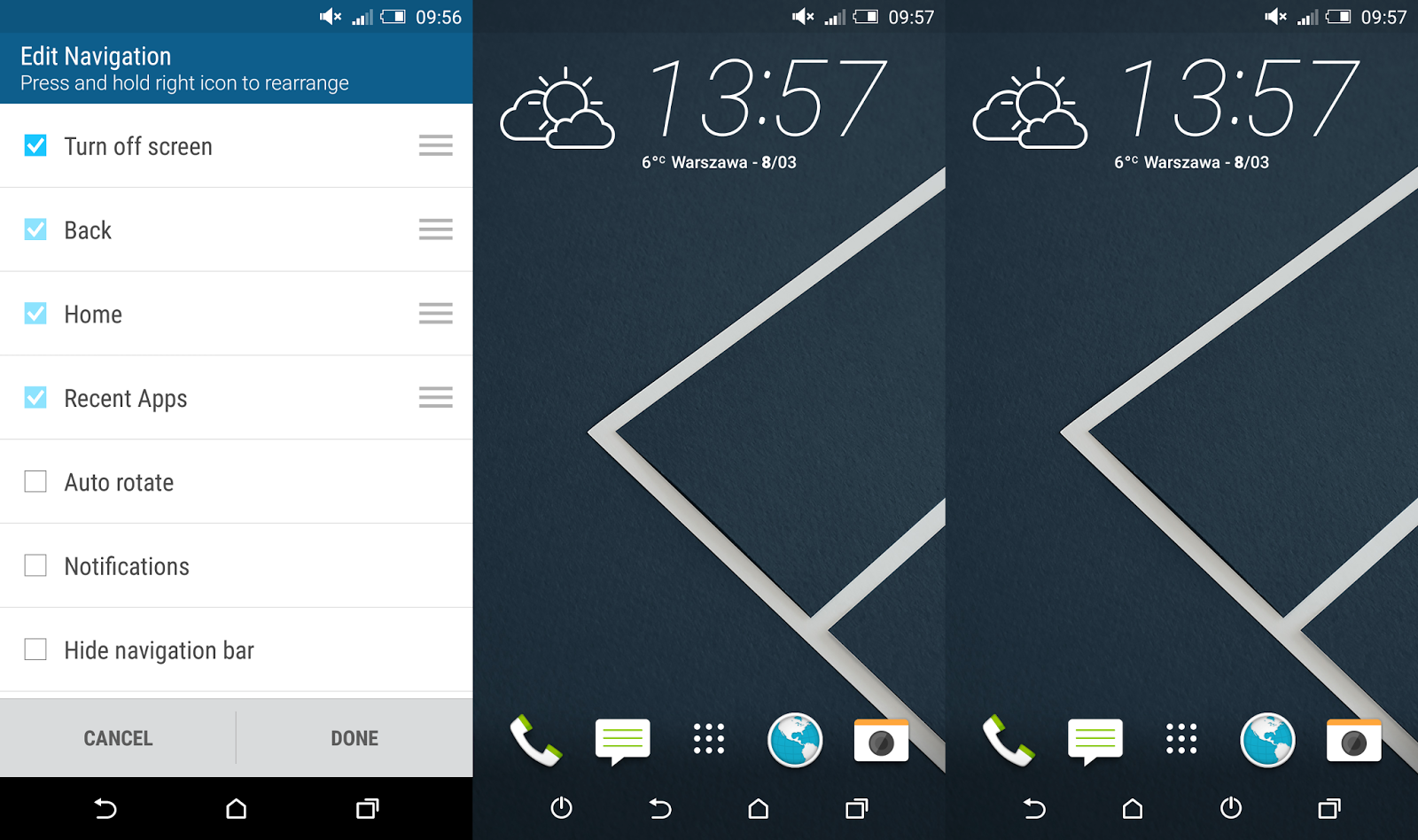
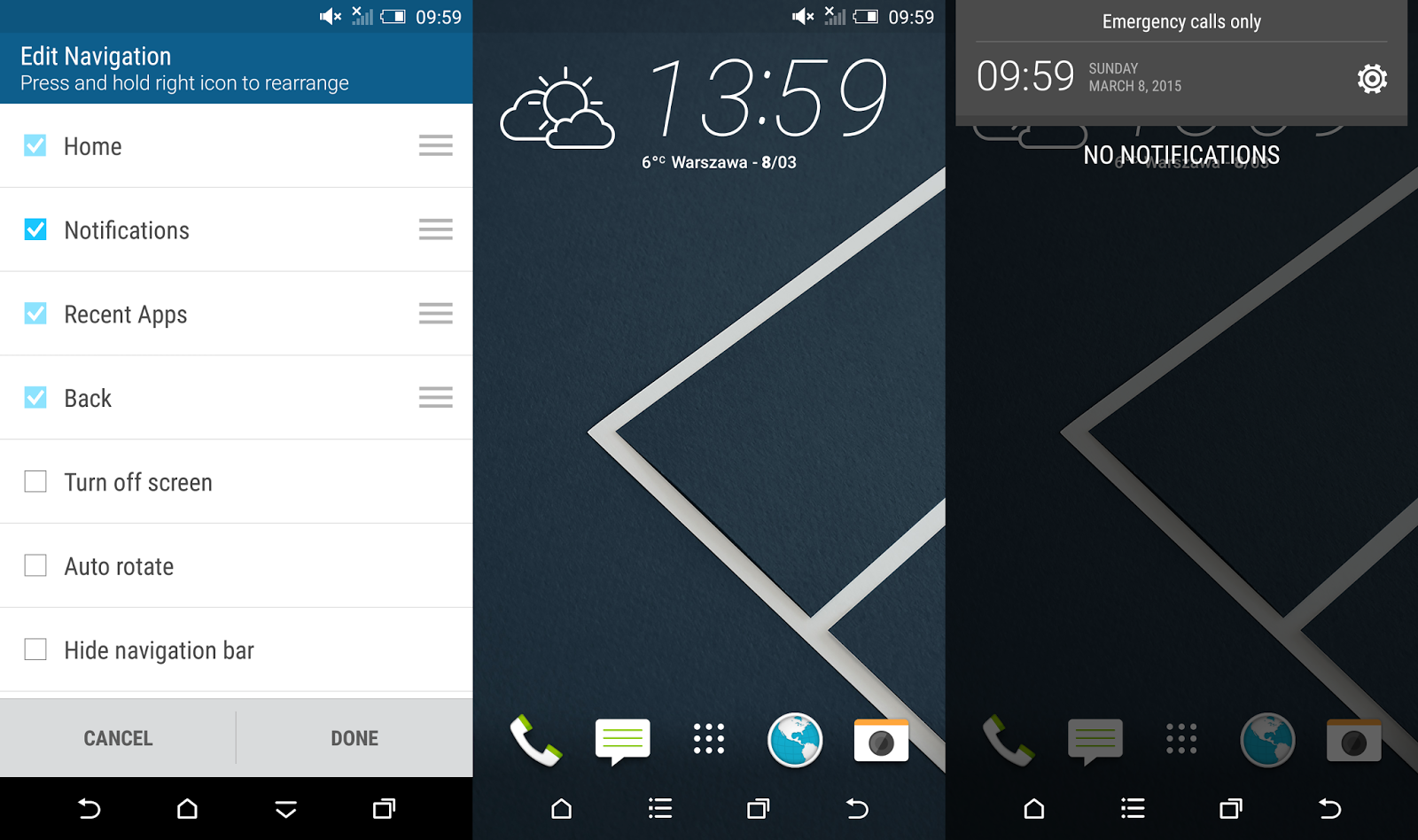
According to the screenshot you can not only add a 4th button but also re-arrange the position of all buttons. That means you can have your extra button either on the right or left side of the navigation bar or between other buttons.

The "Turn off screen" button can be really handy in case you want to switch off your screen really fast, without moving the finger outside the screen area. In combination with HTC Motion Launch Gestures (double tap to wake-up in this case) you dont need to use power button any more!


The "Auto rotate" feature doesnt seems like something I would access few times a day. Personally I would prefer to have a "Rotate" function there to force the screen orientation I want to use in a particular moment, no matter how I keep the device (horizontally or vertically).


The "Notifications" button is a great alternate for the swipe down the status bar gesture when you want to access notifications.


The "Quick Settings" button, just like "Notifications" button allows you to quick access the pull down menu without having to swipe down from the top of the screen.


Last but not least, the "Hide navigation bar" button is one of my favourite. It allows you to completely hide the navigation bar and visually enlarge the home screen. To bring it back you just need to swipe up from the bottom part of the screen. Cool, isnt it?


Do you have any questions or comments? Feel free to share! Also, if you like this article, please use media sharing buttons (Twitter, G+, Facebook) below this post!


For latest news follow Android Revolution HD on popular social platforms:

Read More..

Saturday, December 17, 2016

HTC Sense 7 0 can we expect any of these


With HTC Sense 7.0 right around the corner I thought of making some little "wish-list" of a features I would love to see in the refreshed HTC UI. If you dont know yet - HTC Sense is so far the most advanced and by many known as the best custom Android User Interface. Apple has its iOS, Samsung has its plastic and HTC has its Sense UI.

None of the features are revolutionary, some of them are actually quite common or already available via 3rd party mods (like Sense Toolbox). The thing is, it would be great to have them (at least few of them) available out of the box. Lets go through the list!
  1. New section in / Settings / Personalize / called "Status bar" with the following features:
    1. possibility to remove the clock
    2. possibility to add XX % battery indicator, moved from / Settings /  Power / Show battery level
    3. possibility to have only XX % battery indicator without the battery icon
    4. possibility to have both XX % indicator and a battery icon (current solution). All these features related to the battery level can be sorted this way: / Settings / Personalize / Status bar / Show battery level: show battery icon | show battery level | show both battery icon and level
    5. possibility to change between 4G and LTE icons
  2. Increase the number of icons inside a folder - for some reason the maximum number of icons inside a folder is 20. With so many games and applications in the Google Play its really strange limitation. Im not a gamer, but I have more then 20 games. Shell I have folders like "Games 1", "Games 2", "Games 3" etc?
  3. Possibility to create folders in the app drawer when using the Alphabetical mode. So far we can add folders only in the "Custom" view mode. I would like to organize icons inside the app drawer into folders and keep the aliphatic order of the icons outside folders.
  4. Possibility to customize the battery saver feature - HTC in the Sense 4+ UI introduced a very useful toggle to turn on/off battery saver. However, its barely possible to customize it, even in the HTC Sense 6.0. Possibility to change the moment when the power saver mode is turned on, the CPU min/max frequencies, screen dim level etc. would be really great.
  5. Move the Flashlight and the Calculator apps from the /data/preload back to the /system/app location. I know - this has barely anything to do with the user interface, however I cant find a proper explanation why HTC decided to let these 2 stock apps be on the /data partition instead a /system partition. Its not a big deal as long as the bootloader is not unlocked. After unlocking the bootloader the content of /data partition is being wiped, so both - pretty useful - apps are gone.
  6. Independent Lock Screen short-cuts. I really miss the possibility to use different short-cuts on the Lock Screen and different on the main screen.
  7. Easy copy phone number from the contact details page. Let me explain it this way - go to the People app, enter any contact and long press on the phone number. There is no "Copy" on the list. Instead, you need to select "Edit" first and then select the entire number and copy it. Why not making it easier with just "Copy" command on the long press menu?
  8. Restore the sliding ("scrolling") wallpaper. Or at least give provide an option in the / Setting / Personalize / Home screen to choose between "static" or "scrolling" wallpaper. I really liked that Android feature!
  9. Simple 1x1 alarm clock widget - it would be great to have one, small 1x1 widget that takes you directly to alarm clock settings.
So, what do you thing about these ideas? Do you think that some of them might be already in the HTC Sense 7.0? Or maybe you have something else in mind? Please share your opinion!

Do you have any questions or comments? Feel free to share! Also, if you like this article, please use media sharing buttons (Twitter, G+, Facebook) below this post!


For latest news follow Android Revolution HD on popular social platforms:

Read More..

Thursday, November 17, 2016

HTC Sense 7 0 Wallpapers

Earlier today you had a chance to read more details about HTC Sense 7.0 custom navigation bar. You are already familiar with the new HTC Sense Themes too, and now we want to show you brand new HTC wallpapers you can find in the newest Sense UI. Of course its nothing really major, but I enjoy exploring new HTC Sense 7.0 features and sharing it with you!

At the end of this article you can find a download link with all presented wallpapers.


Download link

Do you have any questions or comments? Feel free to share! Also, if you like this article, please use media sharing buttons (Twitter, G+, Facebook) below this post!


For latest news follow Android Revolution HD on popular social platforms:

Read More..

Monday, November 7, 2016

HTC One M8 received Android 5 0 1 Lollipop with the HTC Sense 6 UI


The best smartphone of the 2014 – the HTC One M8 is already running Android 5.0.1 with the HTC Sense 6.0 interface. Thanks to the OTA update package from the 13th January HTC One M8 owners can already enjoy all the goodies that comes with one of the biggest Android platform update – Lollipop.

The UI is slightly refreshed, but it’s still HTC Sense 6.0 after all. However, HTC is already working on the HTC Sense 7 update that will become official together with the HTC One M9 premiere (if that’s the proper name).

Currently only the HTC One M8 Developer Edition is getting Lollipop OTA and it’s tagged as 4.16.1540.8. WWE Edition (.401) is around the corner too, and it should appear later this week. It will be tagged as 4.16.401.8. But don’t be disappointed, you can already have Android 5.0.1 Lollipop running on your device, even if it’s not the Developer Edition. Just head to this thread and install the latest Android Revolution HD 30.1 based on the 4.16.1540.8 update. It should work on most variants of the HTC One M8, except the U.S. models.
One of the biggest changes in Android 5.0 is ART (Android Runtime) - an application runtime environment used by the older Android mobile operating system. ART replaces Dalvik, which is the process virtual machine originally used by Android, and performs transformation of the applications bytecode into native instructions that are later executed by the devices runtime environment. ART brings improvements in performance, garbage collection, applications debugging and profiling. Among with a tones of security fixes and other major changes, Android 5.0 Lollipop also contains major new platform features for developers, with over 5,000 new APIs added for use by applications.

Its definitely one of the most important system update in the Android history. And since HTC One M8 is the best Android device up to date, its a must have update for every HTC One M8 owner.


Android 5.0.1 Lollipop with the HTC Sense 6.0 for the HTC One M8 (4.16.1540.8) - link


Do you have any questions or comments? Feel free to share! Also, if you like this article, please use media sharing buttons (Twitter, G+, Facebook) below this post!


For latest news follow Android Revolution HD on popular social platforms:

Read More..

Tuesday, November 1, 2016

First custom ROM based on HTC Sense 5 5 is out for HTC One!

Yes, here it is! The one youve been waiting for! Android Revolution HD 30.0 is the world first custom ROM for the HTC One based on Android 4.3 and new HTC Sense 5.5 UI.

Just grab it from downloads section!

My XDA-Developers thread with link to follow my work - http://goo.gl/UajIh2

Have any questions or comments? Feel free to share! Also, if you like this article, please use media sharing buttons (Twitter, G+, Facebook) below this post!
Read More..

Monday, October 10, 2016

HTC Sense 5 5 busted! True screenshots of the incoming HTC UI

Its been some time since we have had HTC Sense 5.0 on the market. In the past few weeks this, considered by many as the best Android UI, also has been released for HTC One X and HTC One X+.

We already know for a few months, that HTC has already been working on the next version of their famous UI - HTC Sense 5.5. Some of the Sense 5.5 features are already present in the latest HTC One Android 4.3 build, however they are currently disabled in the framework.

Today, we present to you the first screenshots of the incoming HTC Sense 5.5 interface. If you are going to share this great news, please dont forget to include the source link too!


Home screen - now you can disable or enable HTC BlinkFeed easily.


Android Quick Settings - now you can re-arrange the content of the QS panel.


Improved HTC keyboard with possibility to add more emoticons.


Improved camera - "Dual capture" and "Panorama+", Storage and Recent Apps panel.


New HTC BlinkFeed categories, custom topics tab and minor changes to alarm clock.


Many more changes are of course under the hood, so expect improved performance and overall UI smoothness. Many bugs are also fixed, so the incoming HTC Sense 5.5 should bring a lot of joy for all HTC fans!

Have any questions or comments? Feel free to share! Also, if you like this article, please use media sharing buttons (Twitter, G+, Facebook) below this post!
Read More..