Pages

Monday, December 19, 2016

Google I O and whats next for work


Google I/O, our annual developer conference, is wrapping up this afternoon. I always love this event because it’s our chance to shine the spotlight on our amazing global developer community – the creative coders who are building what’s next. As we think about developers, along with our own products and tools, we’re focused on the big opportunities of the future: provide the best-in-class mobile platform, help the next billion users by putting the power of the Internet in their hands and solving big problems to make people’s lives better through machine learning and access to great products. There were lots of exciting announcements this year, from Now on Tap to a completely new Photos experience. If you haven’t already, be sure to watch the keynote given by Sundar Pichai, SVP of Products and read the official blog post. For cool scenes and coverage from the floor, check out our Google for Work at I/O Collection on Google+.

I’m particularly excited that many of the announcements we made will impact the world of Google for Work and Google for Education. To highlight a few:

  • Android M. Android’s latest release packs hundreds of performance improvements, including better battery life, easier app linking and streamlined permissions. And with our recent launch of Android for Work, the momentum for Android in the workplace is growing.
  • Firebase. One of the key themes of this year’s I/O is empowering developers with the tools they need to thrive. To that end, Firebase makes building great mobile and web apps easier than ever. It manages the infrastructure on the backend on behalf of mobile developers so they can focus on the high-value stuff: delivering an awesome user experience on the front end. Firebase addresses key mobile use cases, including native support for offline usage when a network connection is unavailable, and automatic data synchronization in real time to the cloud and across diverse client devices. Nearly 200,000 developers rely on Firebase already, and I’m confident it will help accelerate development of mobile apps, including enterprise apps. Check out the team’s I/O Session to learn more.
  • Inbox. Back in October, we introduced a new kind of inbox—one that works for you. In March we announced the Inbox early adopter program, to bring Inbox by Gmail to Google Apps customers. And while we’re still in the early stages, at Google I/O we announced that we’re expanding the early adopter program so any Google Apps for Work customer who wants to use Inbox can. We also announced new ways Inbox can help save you time and stay organized, with Undo Send to take back emails you realize are a mistake, even from your mobile phone, and something many of you requested: custom signatures.
  • Places API for iOS. We launched the Places API for Android in April, along with an iOS beta. Now the Places API for iOS is officially available for all developers with all the same features as the Android version. This means you can integrate Google’s database of 100 million places worldwide into your app experience. Check out the announcement post to learn more and read customer experiences.
  • Google Expeditions. Expeditions is a new educational tool that lets teachers take their classes on virtual field trips to anywhere using Google Cardboard. It’s a great, inexpensive way for the next generation of creators to experience their world.

We know that technology works best when it gets out of the way and helps people get stuff done from anywhere. These announcements are a step in that direction: new approaches to managing email, powerful tools for developers to build great apps and an updated version of Android. The future of work is bright, and I can’t wait to see what comes next.
Read More..

What’s in a message Getting attachments right with the Google beacon platform

Posted by Hoi Lam, Developer Advocate

If your users’ devices know where they are in the world – the place that they’re at, or the objects they’re near – then your app can adapt or deliver helpful information when it matters most. Beacons are a great way to explicitly label the real-world locations and contexts, but how does your app get the message that it’s at platform 9, instead of the shopping mall or that the user is standing in front of a food truck, rather than just hanging out in the parking lot?

With the Google beacon platform, you can associate information with registered beacons by using attachments in Proximity Beacon API, and serve those attachments back to users’ devices as messages via the Nearby Messages API. In this blog post, we will focus on how we can use attachments and messages most effectively, making our apps more context-aware.

Think per message, not per beacon

Suppose you are creating an app for a large train station. You’ll want to provide different information to the user who just arrived and is looking for the ticket machine, as opposed to the user who just wants to know where to stand to be the closest to her reserved seat. In this instance, you’ll want more than one beacon to label important places, such as the platform, entrance hall and waiting area. Some of the attachments for each beacon will be the same (e.g. the station name), others will be different (e.g. platform number). This is where the design of Proximity Beacon API, and the Nearby Messages API in Android and iOS helps you out.

When your app retrieves the beacon attachments via the Nearby Messages API, each attachment will appear as an individual message, not grouped by beacon. In addition, Nearby Messages will automatically de-duplicate any attachments (even if they come from different beacons). So the situation looks like this:

This design has several advantages:

  • It abstracts the API away from implementation (beacon in this case), so if in the future we have other kinds of devices which send out messages, we can adopt them easily.
  • Built in deduplication means that you do not need to build your own to react to the same message, such as the station name in the above example.
  • You can add finer grained context messages later on, without re-deploying.

In designing your beacon user experience, think about the context of your user, the places and objects that are important for your app, and then label those places. The Proximity Beacon API makes beacon management easy, and Nearby Messages API abstract the hardware away, allowing you to focus on creating relevant and timely experiences. The beacons themselves should be transparent to the user.

Using beacon attachments with external resources

In most cases, the data you store in attachments will be self-contained and will not need to refer to an external database. However, there are several exceptions where you might want to keep some data separately:

  • Large data items such as pictures and videos.
  • Where the data resides on a third party database system that you do not control.
  • Confidential or sensitive data that should not be stored in beacon attachments.
  • If you run a proprietary authentication system that relies on your own database.

In these cases, you might need to use a more generic identifier in the beacon attachment to lookup the relevant data from your infrastructure.

Combining the virtual and the real worlds

With beacons, we have an opportunity to delight users by connecting the virtual world of personalization and contextual awareness with real world places and things that matter most. Through attachments, the Google beacon platform delivers a much richer context for your app that goes beyond the beacon identifier and enables your apps to better serve your users. Let’s build the apps that connect the two worlds!

Read More..

Belgian employment agency VDAB offers job services at the speed of Google Apps


Editors note: Today’s guest blogger is Michael De Blauwe, project leader of the Innovation Lab at VDAB, the public employment bureau for Belgium’s Flanders region.

In the past, clients walked into one of our employment offices and waited to meet with one of our consultants. Today, they don’t have to leave home to get face-to-face feedback on their resumes or participate in mock interviews. Timing is critical for job seekers, and at VDAB – the public employment bureau for Flanders – we’re using Google Apps to more quickly and efficiently help people in need of job services and training. We’re also reaching more people while saving money by reducing the number of physical employment centers by nearly 30%.

What used to take a week for an in-person resume workshop followed by a practice interview, now happens in less than 24 hours. Our thousands of employment specialists use Google Hangouts and Google Docs to review customers’ resumes and coach them on interview skills. This digital transformation has been a hit with job seekers. In 2013, we had 4,920 people use our new e-coaching services, and 83% said they would recommend it to friends.

We’re not just using Apps to serve more people — we’re delivering better service. VDAB job coaches now use Google Drive to store resources and Docs to comment on clients’ resumes while speaking with them on Hangouts. All of a client’s job-related files are stored in one place, with all feedback contained within the document.

Our team also works together more efficiently. Because our coaches work from different locations throughout Flanders, it’s helpful to have a central repository that allows people to share information and work together from different locations. We use Google Drive to share information about job openings and Google Sheets to track customer queries in a single document that everyone can access. Before Google, we’d send thousands of emails back and forth to share resources, respond to customers, and schedule appointments.

When we made a company-wide push behind Apps in 2012, using our early Google adopters to inform others, we found that it was already taking hold. Now that all of VDAB has switched to Apps, we’re moving faster, helping more people build their job-seeking skills and matching more employers with qualified candidates.

We worked with Capgemini, a Google Apps Premier Partner in Belgium, who performed this successful migration.
Read More..

Sunday, December 18, 2016

Head back to school with new features in Google Classroom


(Cross-posted on the Google for Education Blog.)

As you gear up for the new school year, try the newest features in Google Classroom for more ways to save time, engage your students and keep everyone organized. Most of these features are rolling out this week; stay tuned in the next few weeks for more back-to-school goodies in Google Classroom, Google Docs, Sheets and Slides, all designed to help you make this school year yours.

Keep students engaged with question-driven discussions 

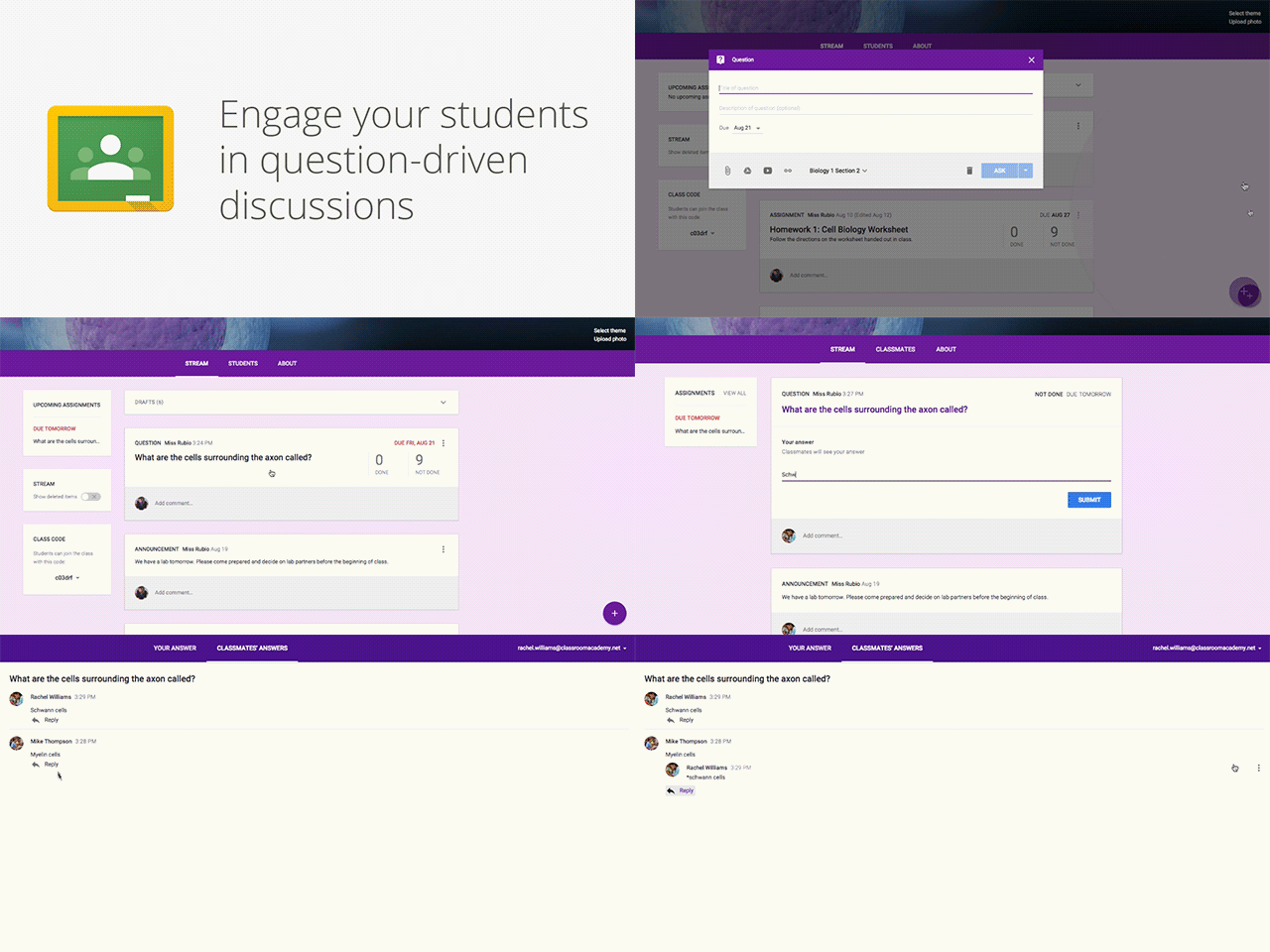
Since Classroom launched last year, teachers have been using their class stream to host student debates, Q&A and discussions. Starting today, you’ll be able to do this in a more collaborative way. You can post questions to your class and allow students to have discussions by responding to each other’s answers (or not, depending on the setting you choose). For example, you could post a video and ask students to answer a question about it, or post an article and ask them to write a paragraph in response.

“Often, teachers want to do a quick check-in on what their students are learning. Now with this built in to Google Classroom, teachers can easily do this on the fly, any time,” said Michael Fricano II, who teaches at Iolani School in Honolulu. “Your class can have a really engaging, focused conversation.”

Reuse posts 

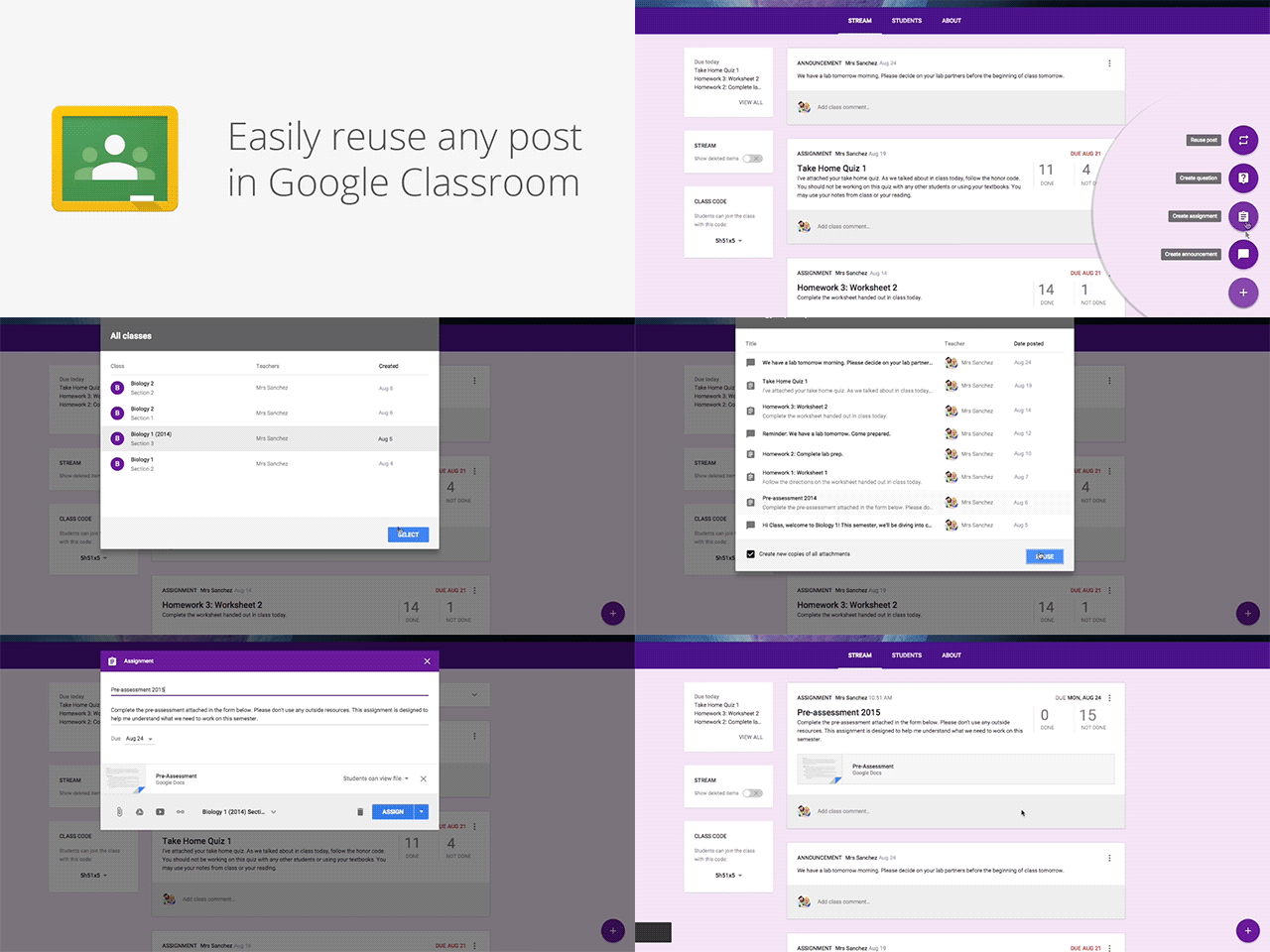
You know those lessons that worked so well last year that you want to use them again? Now you can reuse assignments, announcements or questions from any one of your classes — or any class you co-teach, whether it’s from last year or last week. Once you choose what you’d like to copy, you’ll also be able to make changes before you post or assign it.

“The reuse post feature gives teachers the gift of time. Making changes to something already created is way easier than starting from scratch,” said Heather Breedlove, Technology Integration Coordinator at Flagstaff Unified School District in Arizona. “It’s working smarter, not harder.”


Calendar Integration 

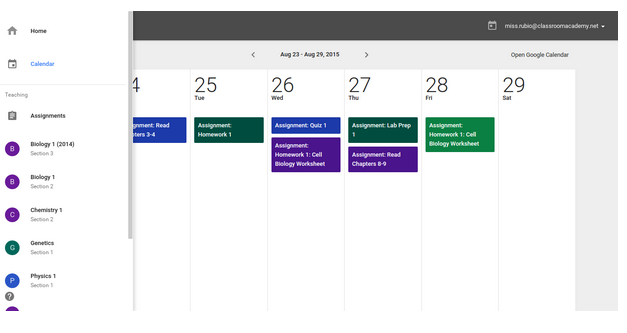
In the next month, Classroom will automatically create a calendar for each of your classes in Google Calendar. All assignments with a due date will be automatically added to your class calendar and kept up to date. You’ll be able to view your calendar from within Classroom or on Google Calendar, where you can manually add class events like field trips or guest speakers.


And a few more improvements you’ve asked for:

  • Bump a post: When you want to make sure an older item is easy for students to find, you can now move any post to the top of the stream. 
  • Due dates optional: For long-term projects or student-driven assignments, you’ll now have the option to create assignments that don’t have due dates. 
  • Attach a Google Form to a post: Many teachers have been using Google Forms as an easy way to assign a test, quiz or survey to the class. Coming in the next few weeks, teachers and students will soon be able to attach Google Forms from Drive to posts and assignments, and get a link in Classroom to easily view the answers. 

In case you missed it 

We know YouTube is an important source of educational content for many schools. Because it also contains content that an organization or school might not consider acceptable, last month we launched advanced YouTube settings for all Google Apps domains as an Additional Service. These settings give Apps admins the ability to restrict the YouTube videos viewable for signed-in users, as well as signed-out users on networks managed by the admin. Learn more here.

All of us on the Classroom team have been deeply touched by the teachers in our lives, who inspire us in the work that we do. For me, that’s my brother Tuan, an English teacher at the Chinese International School in Hong Kong. We make these products for you. And we hope these new features will help you kick off another incredible year of teaching and learning.
Read More..

Saturday, December 17, 2016

Lost Lands Full v1 0 15 APK DATA PAID FULL

Cover art
https://play.google.com/store/apps/details?id=com.fivebn.lostlandsdo_full
Susan had just stepped away to answer the phone, but when she returned she saw something pulling her son Jimmy through a shimmering portal. It closed before she could pull him back. To save him, she must find a way to this other world. Before Susan lies a world that no one else has ever seen before... a world where magic is real and anything is possible. Find out who took Jimmy and what they want in Lost Lands: Dark Overlord!

Whats New

Bugfix


Download Lost Lands (Full) v1.0.15 APK+DATA (PAID + FULL)
Read More..

Android Revolution on the HTC One 2014 launch event in London


Can’t wait to see the new HTC One 2014? Don’t worry, we’ll be there for you! Stonelaughter, our precious blog member will be there in London, watching the rebirth of the most awarded smartphone of the year 2013. We’ll have a portion of hot pictures for you as well as detailed description of the device presented on the launch event.

Make sure to keep your eyes on android-revolution-hd.blogspot.comand also follow Stonelaughter on his Twitter profile @Stonelaughter.

And that’s not all. One of our contributors, radiotribis going there too! That means the double fun! Make sure to follow on Twitter that folk too (@kevinsalt) if you want to be the first to discover All The New One!

Be there with us!


For latest news follow Android Revolution HD on popular social platforms:

Read More..

HTC Sense 7 0 can we expect any of these


With HTC Sense 7.0 right around the corner I thought of making some little "wish-list" of a features I would love to see in the refreshed HTC UI. If you dont know yet - HTC Sense is so far the most advanced and by many known as the best custom Android User Interface. Apple has its iOS, Samsung has its plastic and HTC has its Sense UI.

None of the features are revolutionary, some of them are actually quite common or already available via 3rd party mods (like Sense Toolbox). The thing is, it would be great to have them (at least few of them) available out of the box. Lets go through the list!
  1. New section in / Settings / Personalize / called "Status bar" with the following features:
    1. possibility to remove the clock
    2. possibility to add XX % battery indicator, moved from / Settings /  Power / Show battery level
    3. possibility to have only XX % battery indicator without the battery icon
    4. possibility to have both XX % indicator and a battery icon (current solution). All these features related to the battery level can be sorted this way: / Settings / Personalize / Status bar / Show battery level: show battery icon | show battery level | show both battery icon and level
    5. possibility to change between 4G and LTE icons
  2. Increase the number of icons inside a folder - for some reason the maximum number of icons inside a folder is 20. With so many games and applications in the Google Play its really strange limitation. Im not a gamer, but I have more then 20 games. Shell I have folders like "Games 1", "Games 2", "Games 3" etc?
  3. Possibility to create folders in the app drawer when using the Alphabetical mode. So far we can add folders only in the "Custom" view mode. I would like to organize icons inside the app drawer into folders and keep the aliphatic order of the icons outside folders.
  4. Possibility to customize the battery saver feature - HTC in the Sense 4+ UI introduced a very useful toggle to turn on/off battery saver. However, its barely possible to customize it, even in the HTC Sense 6.0. Possibility to change the moment when the power saver mode is turned on, the CPU min/max frequencies, screen dim level etc. would be really great.
  5. Move the Flashlight and the Calculator apps from the /data/preload back to the /system/app location. I know - this has barely anything to do with the user interface, however I cant find a proper explanation why HTC decided to let these 2 stock apps be on the /data partition instead a /system partition. Its not a big deal as long as the bootloader is not unlocked. After unlocking the bootloader the content of /data partition is being wiped, so both - pretty useful - apps are gone.
  6. Independent Lock Screen short-cuts. I really miss the possibility to use different short-cuts on the Lock Screen and different on the main screen.
  7. Easy copy phone number from the contact details page. Let me explain it this way - go to the People app, enter any contact and long press on the phone number. There is no "Copy" on the list. Instead, you need to select "Edit" first and then select the entire number and copy it. Why not making it easier with just "Copy" command on the long press menu?
  8. Restore the sliding ("scrolling") wallpaper. Or at least give provide an option in the / Setting / Personalize / Home screen to choose between "static" or "scrolling" wallpaper. I really liked that Android feature!
  9. Simple 1x1 alarm clock widget - it would be great to have one, small 1x1 widget that takes you directly to alarm clock settings.
So, what do you thing about these ideas? Do you think that some of them might be already in the HTC Sense 7.0? Or maybe you have something else in mind? Please share your opinion!

Do you have any questions or comments? Feel free to share! Also, if you like this article, please use media sharing buttons (Twitter, G+, Facebook) below this post!


For latest news follow Android Revolution HD on popular social platforms:

Read More..